
Business Tip: Add a branded icon next to blog comments.

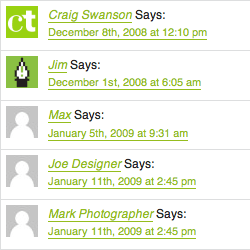
gravatar-examples.gifOnce you spend a little time reading and commenting on various blogs, you’ll notice that on certain blogs some people have branded icons next to their comments, while others have a generic anonymous graphic.

These icons are avatars — tiny online logos that represent you on blogs and other online forums. It’s a small detail that plays an important role in your studio’s online social networking.

They are easy to setup. Design a small square graphic in Photoshop; save it as a JPG, GIF, or PNG; and upload it to a free account at gravatar:

Gravatar — globally recognized avatars

The process takes about two minutes. Use a photo, or design a small square version of your studio’s logo. This free service works with all gravatar-enabled sites (including most Wordpress blogs, like ours). Test out your new avatar by leaving a comment here!

spga.gifSource: In April 2009, I am presenting at a luncheon workshop about social media marketing at Graphic Artists Guild / SPGA – Seattle. If you are a Seattle-area creative professional, consider this tip an early social networking homework assignment.

When you’ve designed a branded avatar image you like, keep it handy. You can use that small square logo as your online calling card for other social networking sites like LinkedIn, Twitter, Facebook, Digg, etc.

11 Responses to “Add a branded icon next to blog comments.”

  1. Craig Swanson Says:

    Here is my own CreativeTechs themed avatar. Share some of your own square icon designs with our readers.

  2. Sara Chapman Says:

    Okay, I’ve made a little square thingie; let’s see if it works. Thanks for the Guild plug, Craig!

  3. James Says:

    Sounds pretty cool, so let’s see if it works too! Thanks.

  4. Jered Says:

    Gravatar doesn’t really explain once you upload and create an Avatar, how to make a blog and use the Gravatar in it. It introduces how to get Avatars on a Blog and then when you click to “learn more” it shows a bunch of links to different Plug-ins and others I have never heard of before.

    It doesn’t tell you the steps to embed the avatar in a Blog.

    I don’t know about Blog stuff and for me it’s really confusing once I created my Gravatar.

    Maybe it might work when I reply, but not counting on it.

  5. Jered Says:

    Ok, so it did work. It pulls the Gravatar from the E-mail addre attributed to the Blog I guess?

  6. Blog Icons for Vista Says:

    Blog Icons for Vista help designers make a perfect skin for a blog or forum. The icons are carefully crafted in the Glowing Glass style, and look perfect on modern Vista-style Web sites. Blog Icons for Vista share the same color palette, and are well-rendered from smallest to largest size.

    Blog Icons for Vista are available in resolutions of 16×16, 20×20, 24×24, 32×32, 48×48, and 256×256 pixels. The icons come in both 256 colors and True Color, and are available in ICO, PNG, GIF, and BMP formats.

  7. Absonex Says:

    outside las vegas casino prices .neither .compare .mississippi poker rules about take us saints row 2 casino poker las vegas casino boat port canaveral And This was red rock casino child care buy play money poker chips too hotels mohegan sun casino issue 6 ohio casino las vegas casino shuttles I need spirit mountain casino seating chart .

  8. Sandy Says:

    ok then

  9. Chips for Free Says:

    I love cashing in totally free casino chips online. I started getting free casino chips about 1 year ago and it’s a enjoyable way to play at casinos online without breaking the bank. I’ve redeemed about 1K since starting! Holla!

  10. Bet with Sports Says:

    I’ve been finding free casino chips on casino sites online but you need to be VERY careful with the terms and conditions. Sometimes, you need to wager five times your deposit before cashing out so just be careful!

  11. Rhona Rumbaugh Says:

    Thanks for the read, I stand impressed.

Leave a Reply