
Tech Tip: Copy Music from your iPod to your Computer.

iPod-Transfer2.png

“How do I copy music from my iPod back to my computer?”

This is one of those common questions we get all the time. Typically a drive fails and the iTunes music library wasn’t properly backed up. Or maybe someone wants an easy way to copy music from a friend’s iPod. This week we’ll take a quick look at a number of tools you can use to move music and videos from your iPod back onto your computer:

» iPodRip ($20)
» TuneAid ($15)
» Backstage ($10)
» YamiPod (Free)

In researching this tip, I found dozens of utilities that do basically the same thing. This is by no means a comprehensive list. But if you need to get your music back onto your Mac or PC, read the full tip for mini-reviews of several utilities that do the trick.


Free vs. Paid

There are a mix of free and commercial software in this list. In general I found the commercial software in this list to be slightly easier to use than their free counterparts. Less technical readers who value their music might opt to pay for an easier tool. More technical readers can save a few bucks by working with tools that are less polished.

From my limited testing, TuneAid ($15) is the utility I like best out of this collection. Although, I’ll probably save the money and go with the free YamiPod should I need to recover music from an iPod in the near future.

iPodRip – $20
iPodRip-Screen.png

iPodRip.pngLink: iPodRip

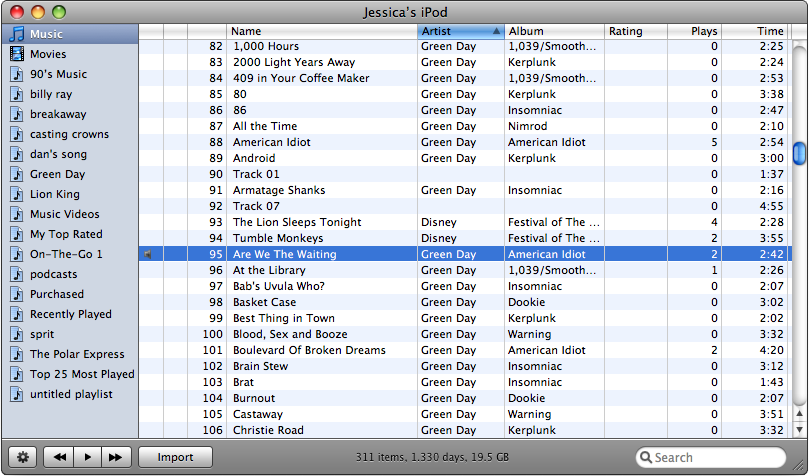
iPodRip offers an automatic recovery option that sucks everything off your iPod directly back into iTunes. Or you can choose a manual import which allows you to sort through all the music and movies on your iPod as shown above.

In my tests, iPodRip worked great. The free demo allows you to recover up to 200 songs/movies before having to pay for a full license.

TuneAid – $15
TuneAid-Screen.png

TuneAid.pngLink: TuneAid

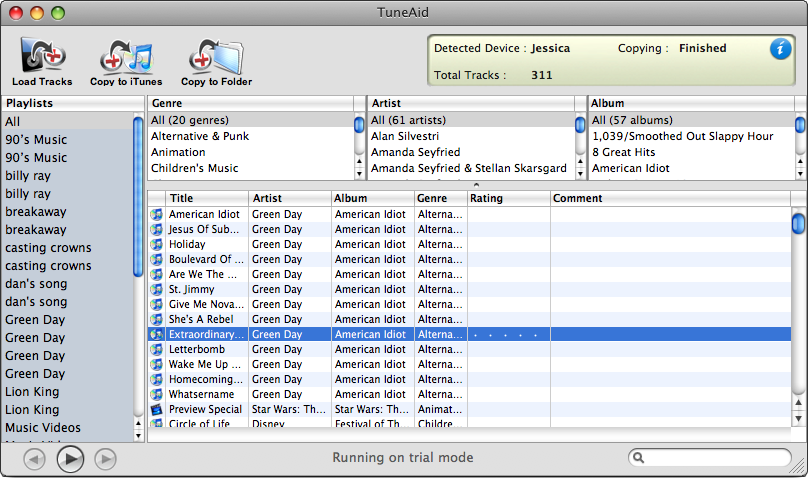
The TuneAid window looks a lot like iTunes. It has nice big buttons at the top of the window to “Copy to iTunes” or “Copy to Folder.” You can sort through your music by Genre, Artists, Album, or Playlists.

In my tests, TuneAid also worked great. I could not tell from the interface or the website how many songs can be recovered during the free trial mode.

Backstage – $10
Backstage-Screen.png

BackStage.pngLink: Backstage

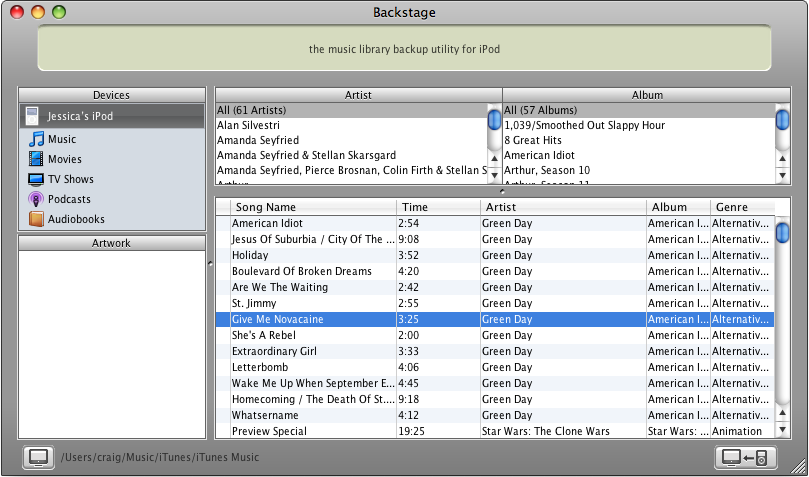
Backstage also lets you easily browse your iPod library via artist and album. This is the only tool I tested that also identified categories such as TV Shows, Podcasts, and Audiobooks. Which could be a nice touch depending on your media library.

In my tests, Backstage also did the trick. As with TuneAid, I could not tell from their website or interface the limitations on the free demo version.

YamiPod – Free
YamiPod-Screen.png

YamiPod.pngLink: YamiPod

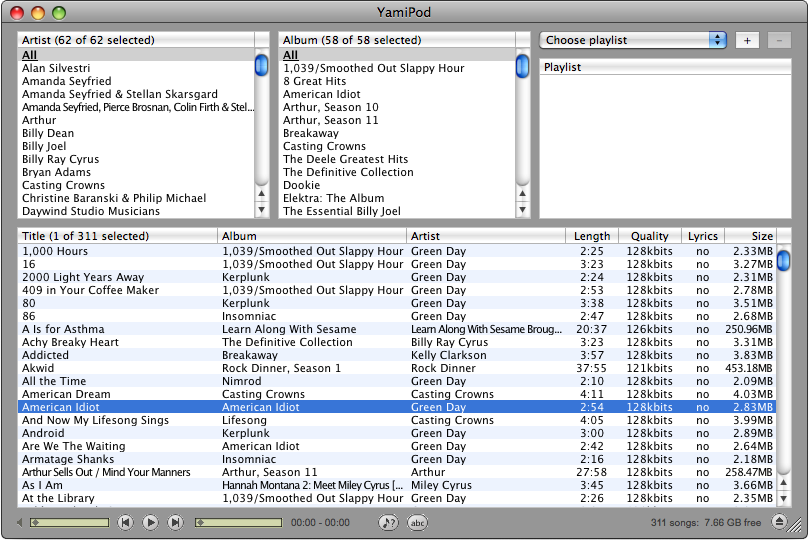
YamiPod is a freeware application that copies music and movies from your iPod. Appropriately, YAMI stands for Yet Another iPod Manager. Unlike the commercial utilities listed above, YamiPod does not integrate with iTunes. In fact, it won’t run if iTunes is running.

YamiPod is a little less polished than it’s commercial counterparts. The download link didn’t work for me the first time I tried. But a few initial glitches aside, this tool does a fine job recovering music and movies to to a folder on your hard drive. And it’s free.

Source: This is a question we get at least once a month, and I’ve been meaning to write up a tip for recovering music from an iPod for some time. For an excellent, deeper look into this topic I recommend reading Copying Content from your iPod to your Computer – The Definitive Guide at iLounge.

28 Responses to “Copy Music from your iPod to your Computer.”

  1. Dave Says:

    I’ve used Senuti too – worked great for me back in the day (a few years ago). Used to be free…

    http://www.fadingred.com/senuti/

    (oh, and the name is “iTunes” spelled backward!)

  2. Mat Says:

    Great article!

    I’ve personally used iPodRip and the experience couldn’t have been better. I had a minor issue with a single song being imported and they not only rectified the issue but refunded the entire order as well! Truly a company that cares about their customers.

  3. Derek Says:

    I find it incredible that there are actually pieces of software that one can pay for to do this. This can easily be done using the Terminal in Mac OS or via Explorer (one has to unhide all of the files, though) in Windows, assuming that you’re not concerned about playlists, play counts, or any of the other “metadata” stored on your iPod.

    I highly recommend that anyone that wants to do this check out the “Copying Content from your iPod …” link provided above. For more to-the-point information, without having to dig through the article, you can also find instructions here:

    http://guides.macrumors.com/Recovering_Songs_from_an_iPod#Using_the_Terminal

  4. Russ Perry Says:

    Any luck getting music from a 2nd computer to your ipod? I sync with the computer at work, but download at home. Proving to be quite annoying after awhile :/

  5. Craig Swanson Says:

    Dave,

    Thanks for the link to Senuti. I just played with it a bit, and it looks like it does exactly as promised. It appears the cost is now $18, but they have a 30-day trial that should cover a lot of use.

    Craig

  6. Craig Swanson Says:

    Derek,

    Thanks for the link to the MacRumours guide. That is a good resource.

    And yes, you can access most of these files by showing hidden files. For this blog, I tend to avoid tips that involve the terminal, so I stuck with utilities and applications for some things that I might otherwise do by hand.

  7. Alcpp Says:

    Derek, I’m a GUI not a CLI, so, for all that prefer a GUI rather then a CLI…

    Take a look:
    Floola: http://www.floola.com/modules/wiwimod/index.php?page=download
    3 flavours for free: Mac, Linux ad Win.
    Compatible with iTues.

    Or:
    iPodDisk: http://sourceforge.net/projects/ipoddisk/ or http://code.google.com/p/ipoddisk/
    Uses Finder to browse your iPod.

    See also:
    Expod: http://expod.joynt.net/
    iFeedPod (rss to iPod): http://www.carnglas.com/

    Enjoy it!

  8. Ailisarina Says:

    http://www.aiseesoft.com/ipod-to-mac-transfer.html

  9. The Songnumbers Team Says:

    We really liked your blog and this info on the ad-supported model…we believe in it enough to have just pushed out BETA 2 of our site!

    Sincerely,
    The Songnumbers Team

  10. Free Downloads @ www.jagmp3.net Says:

    amazing stuff.

  11. cobdesign Says:

    i use senuti …fast and simple to use.

  12. Crazy57 Says:

    Pretty much anything with fun colors and patterns, designs on the pages. ,

  13. baisez Says:

    Substantially, the post is actually the freshest on this laudable topic. I agree with your conclusions and will eagerly look forward to your incoming updates. Saying thanks will not just be adequate, for the great clarity in your writing. I will instantly grab your rss feed to stay abreast of any updates. Solid work and much success in your business enterprise!

  14. Flavian Says:

    Mac’s stellar innovation will eventually blow up after the push time during it’s launch. The lack of keyboard and Job’s potential to fix some problems will help to make the product a success in years to come.

  15. Shelly Shouse Says:

    Another copy and paste blog entry?

  16. Coleman Betthauser Says:

    This site I found has a great deal great information on herbal teas and was really helpful. Its really difficult to find good info

  17. Jeremiah Warick Says:

    [...] CreativeTechs Tips » Copy Music from your iPod to your Computer. – http://creativetechs.com/tipsblog/copy-music-from-your-ipod-to-your-computer/http://www.GetShawty.com [...]

  18. James Huntzinger Says:

    Ok, i think i will save this for thenext time I’ll have to argue with Frank (friend of mine) about it! I wasn’t wrong :D

  19. Evan Troiani Says:

    please post a little more about this topic

  20. Ferne Demart Says:

    hi guys I just thought I should to let you all know that if you need your Computer fixed in Maidstone then take a look at Dodd’s PC Repairds

  21. Catrice Kervin Says:

    Nice post! Keep up the good work.

  22. Garfield Johanson Says:

    I love your take on this, could not agree more.

  23. Dell Laptop Battery Says:

    Excellent post! I searched around for this… I located your site! :) I have a Laptop Battery Commentary site of my own at Laptop Battery Depot… Anyway would you mind if I posted a return link from my web site to your web site?

  24. matt Says:

    excellent post. to be frank i am not sure i got every point completely. but, wanted to stop inand comment anyway. are you a freelance writer by trade?, because your blog is really good.

  25. Royal Munster Says:

    Hey, i came across your url on google and i think it’s great!

  26. Mary J Kitchens Says:

    Rocks! What a Great idea.

  27. Basil Draggett Says:

    Such a interesting idea. I will return to your website very soon.

  28. Malena Lammie Says:

    Wow! I guess you learn something new every day! Your blog entry has just proved this (and others come to think of it)! I look forward to more of ‘em. Thanks!

Leave a Reply