
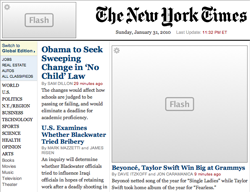
 One of the more controversial choices in the new Apple iPad is the lack of support for Flash-based content.
So, what does the web look like without Flash? If you are curious, there are a number of utilities and scripts that allow you to disable Flash on your desktop browser. Here are a couple plugins:
Safari (Mac): ClickToFlash
Firefox (both): Flashblocker
Flash elements are replaced with a simple box – which I find does speed up much of my web browsing. When you want to view the Flash, just click on it to play as normal (and option that won’t be available on the iPad).
Source: I was turned onto ClickToFlash by consultant Kyle Pauley who owns and leads the Mac Support side of Creativetechs in Seattle.
