Tech Tip: Macintosh UPS Buyers Guide.

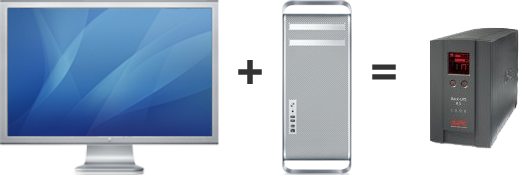
MacUPSEquation.png

A UPS (Uninterruptible Power Supply) provides 5-15 minutes of battery backup should your studio suffer a power outage. More importantly, a good UPS will correct common power problems and provide clean, sufficient, and consistent power for your Mac workstation.

We’ve seen increasing anecdotal evidence that Apple’s new Mac Pros can be especially sensitive to power issues. Adding an inexpensive UPS to your Mac workstation is becoming a standard recommendation for our clients.


The CreativeTechs UPS Buyers Guide:

I’ve sat down to write a short UPS Buyers Guide at least a dozen times over the last year. Each time, I’ve been surprised how difficult this topic is to boil down to a simple tip.

We’ve tried to simply this topic into a short, easy-to-use set of guidelines.

Interpreting Power Supplies: Watts (W) vs. Amps (VA)

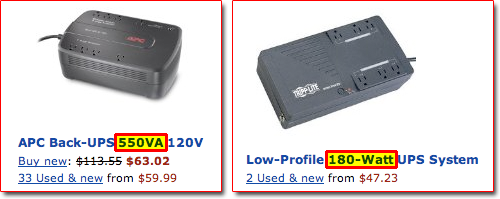
One of the more confusing aspects in picking the right UPS is interpreting how different models describe the amount of power they supply. You will find power alternatively described in Watts (W) or Amps (VA).
Power-Watts-vs-Amps.png

Converting between Watts and Amps turns out to be a lot more involved than you might assume. Let me circumvent a technical discussion of power factor ratios with this rule-of-thumb we use for computer UPS devices:

Watts = 60% of Amps

So in our example above, a 550VA UPS would be roughly the equivalent of (60% of 550) a 330W UPS device.

Macintosh Power Consumption Numbers

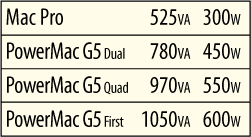
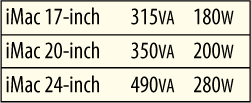
We’ve compiled some general rules for how much power different Mac models require. Most of these numbers come from the Apple Spec Database, although we’ve done the math to provide power needs in both Watts (W) and Amps (VA) to help keep your math simple.

iMac-250px.pngiMac-Watts.png

These number should work for any flat-screen G5 or Intel iMacs produced since late 2004.

MacPro-250px.pngMacPro-Watts.png

While the new Mac Pro is relatively power efficient, the older PowerMac G5 required a substantial power supply.

AppleDisplays-250px.pngAppleDisplays-Watts.png

We’ve chosen to only show newer flat-screen monitors. For older CRT monitors, here is a list of power consumptions for older monitors.

Doing the Math: Picking Your UPS.

To figure out how large a UPS you need, add up the power consumption from the computers and peripherals you plan to connect. For a safety margin, pick a UPS that is rated for 25% higher than you think you’ll need.

Let’s run the numbers and pick a couple UPS devices for different, common scenarios. We’ve had good experience with APC-brand UPS devices, so we’re sticking to those in these examples:
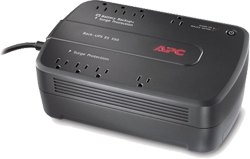
Power-UPS-550va.png#1: APC 8 Outlet 550VA (330W) $65

This UPS will power an iMac for 4-12 minutes, with enough extra power to spare for an external hard drive if needed.
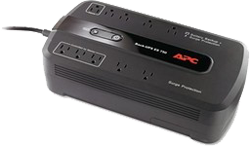
Power-UPS-750va.png#2: APC 10 Outlet 750VA (450W) $85

This UPS will power a Mac Pro, and a single 23-inch or smaller flat screen display for 3-12 minutes.
Power-UPS-1500va.png#3: APC 8 Outlet 1500VA (865W) $199

This UPS is large enough to power an older (power guzzling) PowerMac G5 plus a large display for 5-15 minutes. Or, you could power 3-4 nearby iMacs using this device.

Additional Resources:

For additional details or more precise power-consumption numbers for various Apple products, here are some additional resources you can turn to:

Link: Apple Specs Database

Link: Power Mac G5 Power consumption (Late 2005)

Link: Power Mac G5 Power consumption (Late 2004

Link: Power Mac G5 Power consumption (Original)

Popularity: 1% [?]

11 Responses to “Macintosh UPS Buyers Guide.”

  1. Paul Buerk Says:

    Nice article, Craig. I’m surprised how many users do not have a UPS between their systems and the wall socket, especially those users that do long render processes in Compressor, Maya, or Modo. The APC units are nice, especially the SMART-UPS’s that can do an automated orderly shutdown for you. For the XServe, a 1500 rackmountable works well, and the 2200 will handle the XServe plus an external RAID.

  2. Jonathan Wieder Says:

    Thanks for this overview. Getting a UPS or two is something I never seem to get around to, but with the flaky power in my older neighborhood, it’s moving toward the top of the list. What about connecting external drives, printers, etc, as well? And how does this coordinate with surge protection? Or is that integrated?

  3. Ryan Wagner Says:

    Great reminder article! Upon moving to a Mac Pro from a Macbook Pro I learned the hard way that all UPSs are not the same. I began experiencing lockups and power shutdowns quite frequently for the first week before I realized that my old 550 UPS wasn’t stout enough to handle the Mac Pro and additional Cinema Displays I had added to the setup – a quick web search confirmed my over-site and a run to Best Buy fixed the problem (I ended up with an APC 1500 – the digital display tells you how much power you would have if it was shut off). Now I have a comfortable level of insulation against brownouts and power fluctuations in my home office. I recommend budgeting a UPS with sufficient power for any computer purchase – especially if it is your lively hood.

  4. Ben Greiner Says:

    Hi Craig,

    Kudos for tackling this issue. We’ve often struggled with making sense of it too. In our testing and discussions with APC, the Mac Pros require a Pure Sine Wave and only the (more expensive) Smart-UPS can deliver this. It’s also a good idea to spec a UPS that provides AVR (Automatic Voltage Regulation). I believe only the more expensive Back-UPS (and ALL Smart-UPS) provide this feature.

  5. Craig Swanson Says:

    @Ben,

    That is terrific feedback. Thanks for the extra details.

  6. David Amack Says:

    I did a lot of research before buying *another* UPS when my APC’s battery conked out. That’s when I learned that many users of APC units were reporting early internal battery failure.
    My solution was to buy the Tripp Lite 1000VA UPS from Costco for about $100. The company has a great reputation, and this unit comes with all the features you could want including multi-function LED display and automatic voltage regulation.
    It has plenty of power to keep my Mac Pro and 23-inch LCD display running while I methodically shut things down after a power outage (frequent here on Maui).

  7. Randolph Haack Says:

    My only experience with APC was disappointing. The batteries for two seperate units died in little under a year. Upon APC’s recommendation, I replaced the batteries and discovered the units were malfunctioning as well. The support person I spoke with informed me that I should buy new UPS’ and that mine were old and ready to be discarded. I followed their advice, threw them out and bought two new Belkins. So far, they have been quietly purring along the past six years without a problem.

    I can’t speak for other manufacturers of UPS devices but I will say that Belkin has never let me down. As a result of this experience, now I always try to go with a Belkin product. So far, not one has failed.

  8. Ben Greiner Says:

    Yes, there are many brands available and service providers like us and CreativeTechs are often forced to deal with a variety of brands and models. Over the years every brand has disappointed us at least once. However, APC is the standard and overall we have had very good experience using them.

  9. Ken Ito Says:

    This is a great article and guideline. I wish I had it years ago when I had a blackout that took down my Mac and I decided I needed some serious battery backups. I found a company called MGE that was the only one at the time that was compatible for Macs. They are now sold under Eaton/MGE Office Protection Systems and they’re easy to connect to for monitoring and system shutdown for a Mac environment. They’re always coming out with new products. I’m currently using their Evolution 1550 product and it’s been great. I just plug in the USB cable and it automatically shows up in my Power Management tab. I have it set up to shut everything down cleanly even if I’m not around.

  10. Rhett Johnson Says:

    THANKS Craig & Gang!!!

    I was just a couple weeks ago going thru this for a client (www.acropolisinc.com) they will appreciate this for sure… I’m going to recommend they subscribe to your tips too!!! They need/deserve them.

    Your Homie,
    Rhett J.

  11. Amber Collins Says:

    It is amazing to me how big and how cheap hard drives are getting. These 1 Tb drives could hold so much stuff! I think my first computer had a like an 8 Gb hard drive…lol. It think it also ran only on DOS!

Leave a Reply