
Creative Tip: Preview Photoshop Brush Sets.

If you download a lot of custom Photoshop brushes, you have probably found yourself looking for an easy way to preview what those brushes look like before loading them into Photoshop and trying them out.
Our friend, James Dempsey at The Graphic Mac wrote up two handy tools that make previewing your custom brushes a snap. Both tools are quicker and easier than loading all your brushes into Photoshop in order to see what they look like.
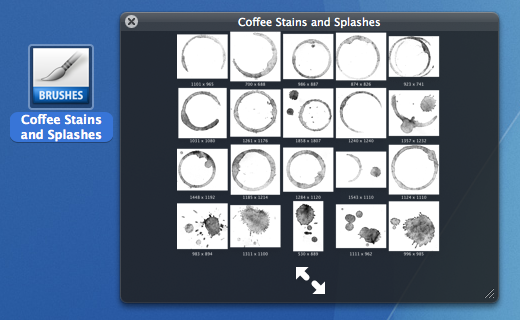
Brush View: Quick Look Preview in OS X Leopard.
BrushView (shown at the start of this article) is an Apple Quick Look plugin that makes viewing your brushes as easy has selecting the brush file in the Finder and hitting the Space Bar. If you are running the latest version of Mac OS X, this is my favorite tool.
Just drop the BrushView Quick Look plug-in into your ~/Library/QuickLook or /Library/QuickLook folder and you’re good to go.
ABRView: Preview Brushes in Windows or Mac
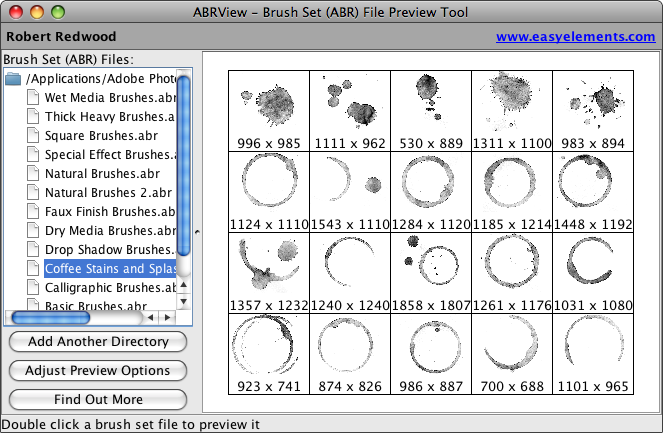
ABRViewer is a tiny Java application that when launched, offers a list of all your brushes already loaded into Photoshop. Just click on the brush set you want to view and they’re displayed in the window. You may have to manually add the Brushes folder from your Photoshop Presets directory.
Mac Users: Make sure to download the non-Windows (.jar) version at the bottom of the page.

Source: This tip was initially inspired by a question during the seventh class in our 10-Week Photoshop Course. If you are a brush fanatic, take a moment to peruse the large archive of brush related tips at The Graphic Mac:
Download over 2,450 Photoshop brushes.
200+ free grunge Photoshop brushes
Free Watercolor brushes for Photoshop
Free waterstain brushes for Photoshop
…or search: Photoshop Brush Tips on The Graphic Mac.

May 4th, 2009 at 7:14 am
Indeed awesome.
A quick question: if I happen to download this plug-in and extra brushes, and I migrate from CS3 to CS4, will I lose everything? Thank you! (I’ll end up doing it anyway, but if I am to lose it, I’ll make a report of everything I got before I do that so I can redo after I am done. Okay, too much doing, but that’s the way it is…)
May 4th, 2009 at 7:19 am
Sonia, these tools allow you to preview your brushes independantly of Photoshop. So when you upgrade to CS4, these preview tools are not involved at all. You will however, have to copy any custom brushes you want to maintain over to the new Photoshop CS4 folders.
May 4th, 2009 at 7:22 am
That was the fastest reply I’ve ever seen on my cyberlife… Thank you!
I was on the verge of forwarding this tip to my mother-in-law who happens to be a Photoshop lover as well…
=) Appreciate it, Craig!
May 4th, 2009 at 8:01 am
Thanks for this tip, I am definitely going to give BrushView a try.
For Windows users (don’t hate me), I’ll throw out another option: ABRViewer.Net which can be found at http://sourceforge.net/projects/abrviewer/
A few months ago I tried this one and the Java app you mention. I don’t remember why, but I preferred the ABRViewer.Net even though I usually go for cross-platform apps (I use Windows and Mac both).
This app allows you to create a full size png image for each brush. I run this feature on each brush set I get and store the PNG images in a library of sorts. I prefer seeing the brushes full size rather than a thumbnail collection. (but you can make a thumbnail collection image if you prefer.)
May 4th, 2009 at 8:30 am
Loud Scream of Joy !!!!!!!!
The ABRViewer is truly the gift from heaven, have been waiting
for:)))))))
Installing was a snap and i did finally figured it out with no
major brain strain.
Thank you all for your always generous shares and creativity.
Blessings to everyone involved!
Sabine
May 4th, 2009 at 8:43 am
great tip, but the .jar download does nothing for my leopard 10.5.6 system; looks like a bunch of class files when expanded out and nothing else, but the brushview add on to finder is much appreciated!
May 4th, 2009 at 9:40 am
I am not able to run the viewer on an iMac G5 under OS 10.5.6, with CS installed. Am I to install the viewer in any particular way? I’m just double-clicking it, and getting an error message that it won’t run. : (
May 4th, 2009 at 12:41 pm
Thanks for the link to my article guys.
For those having troubles with the .jar download – I only have a bit of advice. First, the download ***should*** be a single file ending in .jar. Double clicking the file launches the app – there is no “install.”
Second, I actually downloaded the file a long time ago, and had similar issues where it simply wouldn’t work. I don’t know if it requires the OSX Developer Tools to be installed or not, but at some point I tried it again and it worked.
Third, sometimes it doesn’t pick up all your installed brushes, and you’ll have to add them manually as I did in the screenshot.
May 4th, 2009 at 2:26 pm
fyi….on a mac, I needed to restart to see Brushview work
May 4th, 2009 at 5:36 pm
5/5/09 7:19:01 AM [0x0-0x3c03c].com.apple.JarLauncher[407] Exception in thread “main” java.lang.UnsupportedClassVersionError: abrReader/ABRReader (Unsupported major.minor version 49.0)
that’s all i get, and a bunch more errors in console relating to the .jar load. oh well…
May 5th, 2009 at 12:04 am
OH MY GOD!
…am crying with happiness!
May 5th, 2009 at 11:16 am
A restart does not resolve the problem for me. Oh, well. BTW, that’s on an iMac G5 running Leopard & CS
May 6th, 2009 at 9:08 am
Russell (and any other Mac users running Leopard) I personally much prefer the BrushView Quick Look plug-in (which does require Leopard). Rather than troubleshooting issues with the Java app ABRView, why not just stick with the easy one?
May 6th, 2009 at 12:14 pm
Will do!
: )
May 12th, 2009 at 11:23 pm
Thanks for this hint!
May 21st, 2009 at 7:44 am
Thanks for the tip I was just trying to figure a way to view the brushes I had downloaded yesterday!