
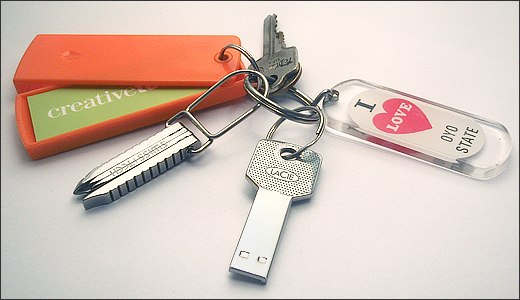
There are three basic tools I need as a modern technical consultant: A flash drive to keep software utilities handy; a small screwdriver to open the occasional computer case; and (most importantly) a steady supply of business cards for referrals and introductions as I talk with people during the day.
I’ve spent more time than I can justify pulling together a basic toolkit that’s with me all the time. Here for your enjoyment, costing less than $100, is my keychain toolkit:
LaCie 8GB iamakey USB Flash Drive. ($35)
Swiss Tech Screwz-All Keyring Tool. ($4.75)
MOO MiniCards & MiniCard Holder. ($19.95 per 100 cards)
I looked at a lot of different products before settling on these three. If you are curious, read on for some alternate flash drives and keychain screwdrivers you might also consider.
Flash Drives
Any good sized flash drive will work for most technical consultants. I’m using an 8GB drive myself. Maybe in a future tip we can write up how we build a bootable drive for various troubleshooting situations.
LaCie has two cool key-shaped USB flash drives that are perfect for a keychain toolkit. They are cutely and confusingly named iamakey (I am a key) or itsakey (it’s a key).
 I prefer the thinner iamakey model shown here. LaCie kept this model thinner and more key-like at the expense of exposing the metal contacts on the USB connector. I know that I’ll probably end up replacing this particular keydrive sooner because those contacts will eventually end up scratched in my pocket. That’s a price I’m willing to accept for such a cool key-like drive.
Of course, any USB flash drive would work for this portable toolkit. If you are more interested in function over form, here are a number of large, inexpensive flash drives to look at:
Kingston 64GB Flash Drive ($119)
Kingston 32GB Flash Drive ($59)
SanDisk Cruzer Micro 16GB Flash Drive ($29)
SanDisk Cruzer Micro 8GB Flash Drive ($21)
Keychain Screwdrivers
These days, I’m not doing a lot of hardware repair. Partially because we’ve got a really talented technician (Jasson Lewellen) to take care of the tricky stuff. Most of the time I just need to open a computer case or install a video card. A good Philips screwdriver is all I need 90% of the time.
 Oddly, while I picked my USB flash drive for it’s key-like appearance, I didn’t make the same choice for my keychain screwdriver. My runner-up choice, the Swiss Tech Utili-Key ($9.95) looks a lot more key-like, and fits better with the visual theme I was going for.
I purchased one of these Utili-Keys to try it out. It clips easily onto a keychain. But I fear the hinge would eventually loosen and my handy screwdriver would inevitably end up lost.
The Swiss Tech Screwz-All Keyring Tool I ended up picking isn’t as cool looking. But it is solid. It won’t fall off my keychain. And most importantly, it includes pull-out mini-screwdrivers that are perfect for the tiny screws found on many laptops.
Another cool keychain screwdriver you might consider is the Swiss Tech Micro-Pro XL which looks a lot like a mini-leatherman.
Moo.com MiniCards
These are cool mini business cards you can easily carry with you. But it was the keychain carrying case that sealed the deal for me:
Source: This keychain toolkit has been one of my pet projects recently. This tip is presented in the hope that maybe a few other tech geeks like myself will discover the freedom and simplicity of never having to hunt for their basic tools again.
